
A front-desk kiosk
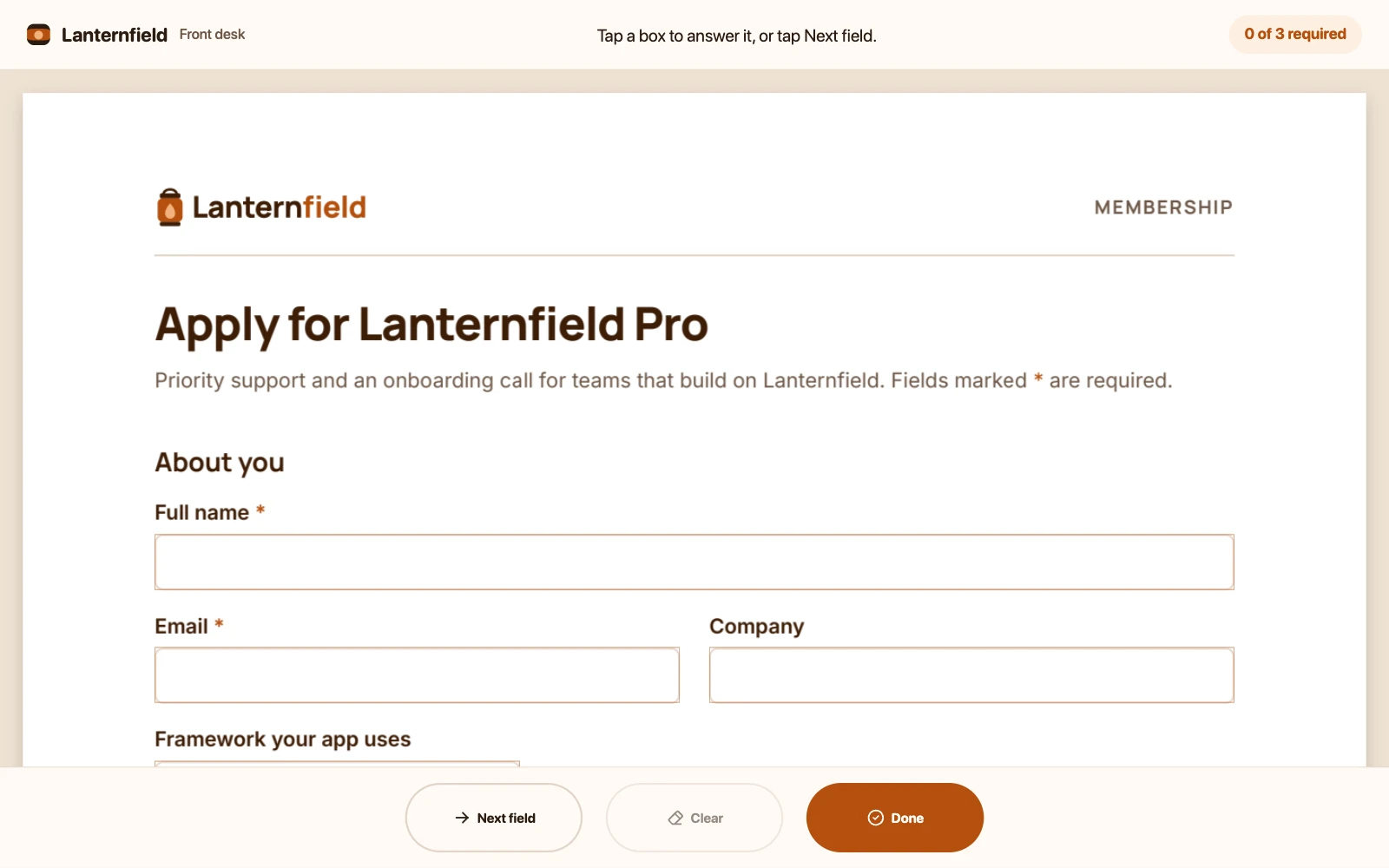
For a tablet on a counter: someone fills in an application and hands it back. The form is all there is, under a header with the desk’s name, the question being answered and how many required answers are in. Three buttons at the bottom, each a finger’s size, put the cursor in the next empty box, clear the form for the next person, and check it: Done lists what’s still missing, or locks the finished form and says thank you.
<script lang="ts">
  import {
    PDFViewer,
    Panel,
    Region,
    type Viewer,
    type ViewerConfig,
    type ViewerPlugins,
  } from '@embedpdf/viewer-svelte';

  import '../kiosk.css';

  const forms = '/pdfs/forms.pdf';

  type Form = ViewerPlugins['form'];

  /** A question on the form: one of its fields. */
  type Question = ReturnType<Form['list']>[number];

  /** How far along the form is: how many questions are required, and which of them are empty. */
  interface Answers {
    readonly required: number;
    readonly missing: readonly Question[];
  }

  // What the commands read from the app: whether the form is done, and how to change that and the
  // header's line.
  interface Kiosk {
    /** Whether the form is complete and handed in: it's locked until Clear. */
    sent: boolean;
    setSent(sent: boolean): void;
    /** Write the header's line. */
    say(line: string): void;
  }

  /** People fill in the form, and nothing else changes it. */
  const FILLING_ONLY = { except: ['forms.filling'] };

  /** What the form calls a question: its tooltip, else its field's name. */
  const labelOf = (question: Question) => question.alternateName ?? question.name;

  /** Whether a value from `exportValues()` is an answer: text, a choice, a ticked box. */
  const isAnswer = (value: unknown) => (Array.isArray(value) ? value.length > 0 : Boolean(value));

  const answersOf = (form: Form): Answers => ({
    required: form.list().filter((field) => field.required).length,
    missing: form.validate().missing,
  });

  // The front desk's viewer: the form, a header and three buttons, nothing else. A constant: the
  // commands read the app from `appState`, so they never hold an old value.
  const config: ViewerConfig<Kiosk> = {
    theme: {
      preference: 'light',
      accent: '#b5500e',
      tokens: {
        background: '#f3e7dc',
        surface: '#fffaf5',
        'surface-raised': '#fffaf5',
        text: '#2b1c12',
        'text-muted': '#6e5848',
        border: '#e3d5c9',
        hover: '#fdefe1',
        canvas: '#efe2d3',
        radius: '14px',
        font: "ui-rounded, 'SF Pro Rounded', 'Segoe UI', system-ui, sans-serif",
      },
    },
    // Every button and menu row a finger's size, even with a mouse plugged in.
    touch: true,
    // A kiosk fills in forms all day and never keeps them: leaving the page asks nothing.
    warnBeforeLeaving: false,
    // No opening, saving or printing files, no search, and no selecting text: a long press is
    // only ever a tap on the form.
    disable: ['documents', 'search', 'text'],
    plugins: {
      stage: { zoom: { mode: 'fit-width' } },
      form: { fields: { background: 'rgb(253 239 225 / 0.9)' } },
    },
    icons: {
      next: ['M5 12l14 0', 'M13 18l6 -6', 'M13 6l6 6'],
      clear: [
        'M19 20h-10.5l-4.21 -4.3a1 1 0 0 1 0 -1.41l10 -10a1 1 0 0 1 1.41 0l5 5a1 1 0 0 1 0 1.41l-9.2 9.3',
        'M18 13.3l-6.3 -6.3',
      ],
      done: ['M12 12m-9 0a9 9 0 1 0 18 0a9 9 0 1 0 -18 0', 'M9 12l2 2l4 -4'],
    },
    commands: [
      {
        id: 'kiosk:next',
        label: 'Next field',
        icon: 'next',
        // The header names the field once the cursor is in it.
        run: ({ appState, viewer }) => {
          if (appState.sent) {
            appState.say('This form is done. Tap Clear for the next person.');
          } else if (!viewer.get('form').focusNext({ empty: true, wrap: true })) {
            appState.say('Every question has an answer. Tap Done.');
          }
        },
      },
      {
        id: 'kiosk:clear',
        label: 'Clear',
        icon: 'clear',
        enabled: ({ get }) => Object.values(get('form').exportValues()).some(isAnswer),
        run: async ({ appState, viewer }) => {
          appState.setSent(false);
          await viewer.get('form').reset();
          viewer.get('stage').goToPage(0);
          appState.say('Cleared, ready for the next person.');
        },
      },
      {
        id: 'kiosk:done',
        label: 'Done',
        icon: 'done',
        run: ({ appState, viewer }) => {
          const { valid } = viewer.get('form').validate();
          appState.setSent(valid);
          appState.say(valid ? 'All done. Thank you!' : 'A few answers are still missing.');
          viewer.get('shell').open('kiosk-check');
        },
      },
    ],
    // A layout of its own: one bar at the bottom with the three buttons and their labels, Done
    // filled in, and the check as a sheet.
    layout: {
      bars: {
        kiosk: {
          place: 'bottom',
          center: [
            [
              { command: 'kiosk:next', variants: ['icon+label', 'icon'] },
              { command: 'kiosk:clear', variants: ['icon+label', 'icon'] },
              { command: 'kiosk:done', emphasis: 'primary', variants: ['icon+label', 'icon'] },
            ],
          ],
        },
      },
      panels: {
        'kiosk-check': { title: 'Your application', present: 'sheet', resizable: false },
      },
    },
  };

  let viewer = $state.raw<Viewer | null>(null);
  let answers = $state.raw<Answers | null>(null);
  /** The header's line. */
  let line = $state('Tap a box to answer it, or tap Next field.');
  /** Whether the form is complete and handed in: it's locked until Clear. */
  let sent = $state(false);

  function setSent(value: boolean) {
    sent = value;
  }

  function say(text: string) {
    line = text;
  }

  function onReady(ready: Viewer) {
    viewer = ready;
    // The form is the document's: `watch` waits for it to open, then follows it as people fill
    // it in, for the header's count and the check.
    ready.watch(
      () => ready.get('form').list(),
      () => (answers = answersOf(ready.get('form'))),
      { immediate: true },
    );
    // The header's line names the question the cursor is in, whether Next field or a tap put it
    // there.
    ready.documents.onOpened(() => {
      ready.get('form').onFocusChanged(({ field }) => {
        if (field) line = `Answering: ${labelOf(field)}`;
      });
    });
  }

  /** Close the check, and put the cursor in a question it lists. */
  function pick(question: Question) {
    if (!viewer) return;
    viewer.get('shell').close('kiosk-check');
    viewer.get('form').focus(question.ref);
  }
</script>

<PDFViewer
  src={forms}
  {...config}
  appState={{ sent, setSent, say }}
  readOnly={sent ? true : FILLING_ONLY}
  onready={onReady}
  style="height: 100%"
>
  <Region name="header">
    <header class="kiosk-header">
      <p class="kiosk-brand">Lanternfield <small>Front desk</small></p>
      <p class="kiosk-line" aria-live="polite">{line}</p>
      {#if answers && answers.required > 0}
        <p class={answers.missing.length ? 'kiosk-progress' : 'kiosk-progress complete'}>
          {answers.required - answers.missing.length} of {answers.required} required
        </p>
      {/if}
    </header>
  </Region>
  <Panel id="kiosk-check">
    {#if sent}
      <div class="kiosk-check">
        <h2>Thank you!</h2>
        <p>Your application is complete. Please hand the tablet back to the front desk.</p>
      </div>
    {:else}
      <div class="kiosk-check">
        <h2>Almost there</h2>
        <p>These questions still need an answer:</p>
        <ul>
          {#each answers?.missing ?? [] as question (question.name)}
            <li>
              <button type="button" onclick={() => pick(question)}>{labelOf(question)}</button>
            </li>
          {/each}
        </ul>
      </div>
    {/if}
  </Panel>
</PDFViewer>
Try it: tap Next field: the cursor goes into Full name, and the header names it. Fill it in, then tap Done: the sheet lists Email and the membership terms, and a tap on one puts the cursor in it. Answer both, tap Done again, then Clear for the next person.
What it uses#
- A whole layout: one bar at the bottom, and a panel.
- Its own commands, with their own icons:
Next field, Clear and Done, with Clear
greyed out while the form is empty. They
read and change the app’s state, whether the form is done and the header’s line, through
appState. - The bar shows them as the viewer’s buttons with their labels, Done as its primary button, made big outlined pills through their parts, smaller on a phone.
touch: true: every button and menu row is a finger’s size, even with a mouse plugged in.- The header region, with the desk’s name, a line that names the question being answered or says what just happened, and the count of required answers.
- A panel of its own that opens as a sheet at every size, opened and closed from code.
- The theme’s tokens for warm paper, round corners and a rounded
font, which the kiosk’s own parts use too. - Read-only, except filling in the form, and read-only once the form is done, until Clear.
- Features turned off: opening, downloading and printing files, search, and selecting text.
- Plugin settings: the pages fit the width, and the fields have a tint of their own, as Form settings shows.
- The form plugin from code:
focusNext()to the next empty field,focus()to one the sheet lists,onFocusChangedfor the header’s line (see Move between fields), the required fields and a reset. watch()on the form fromonReady, which waits for the document, for the header’s count and the sheet; the cursor’s events start from the document.
- No question when the page closes,
warnBeforeLeaving: false: a kiosk fills in forms all day and never keeps them.
Was this page helpful?
Your feedback goes directly to the documentation team.